Recently, IE Business School migrated its Campus Online into Amazon Web Services. Group F of N1 Nov. intake 2012 in IE Business School interviewed with Learning Technology Team in IE Business School about its migration on 30th, April, 2013. Let's listen about new environment.
Thursday, 2 May 2013
Sunday, 28 April 2013
Understanding PaaS for beginners - What and why is it important?
Platform as a Service (PaaS) is …
The cloud-based platform, Google's infrastructure on which web applications run. The users can easily adjust the size of the application based on the increase in traffic. App Engine developers can choose one of the two pricing policies - free account of 500MB storage with 500 million monthly page views or paid account which provides more resources than the free account while the budget can be allocated as needed.
A computing platform over the web. PaaS is to provide environment that allows
you to manage, distribute and development for SaaS application (Software as a Service or cloud
applications) without the cost and complexity of buying and managing the
underlying software/hardware. force.com, Google, and Facebook are leading
players.
Provided by zoho.com
Google App Engine is …
The cloud-based platform, Google's infrastructure on which web applications run. The users can easily adjust the size of the application based on the increase in traffic. App Engine developers can choose one of the two pricing policies - free account of 500MB storage with 500 million monthly page views or paid account which provides more resources than the free account while the budget can be allocated as needed.
Do you want to know more PaaS?? Then, here is “The Power of Platform as a Service ” by
IBM.
https://www.youtube.com/watch?v=l1E32xVCsRsTuesday, 23 April 2013
Cloud computing for Enterprises
In our blog we are keen
to share with you everything about cloud computing! So if you have a business
with various branches in different
cities around the world or even if you are an IT
consultant who works on a multinational company and you are asked to recommend
a cloud computing service provider, then we recommend you to check “Flexible
Computing Express" by Orange Business services.
Flexible Computing Express
Design and manage your own IT infrastructure
_ enjoy an
infrastructure-as-a-service (IaaS) cloudcomputing solution
_ rely on applications
hosted in certified and highly secure data centers
_ easily manage your infrastructure
and IT resources through the Web portal
_ alter them instantly to
support peaks in your activity and to develop new applications
_ pay only for what you
use without investing in servers, so you minimize your investment and control your
costs
for more information about Flexible Computing from Orange, please visit
www.mnc.orange-business.com
Thursday, 18 April 2013
Wow, Amazon is a clouding service provider. Let's call it as AWS.
Amazon
Web Services (AWS) is one of the IaaS (Infrastructure as a Service) in clouding
service. AWS offers a complete set of infrastructure and application services
that enable you to run virtually everything in the cloud from enterprise applications
and big data projects to social games and mobile apps. Amazon began the service
with the idea of utilizing stand-by IT assets during off-season.
Amazon EC2
![]() |
Amazon
EC2 is the most typical IaaS service component of Amazon. Amazon virtualized
hardware servers and provides the user with virtualized hardware resources, and
the user installs OS and soft wares on the virtual machine. The user selects pre-configured
OS image and software or just uploads his or her own image in the form of
Amazon AMI (Amazon Machine Image) for use. EC2 takes the advantage of being
able to install the desired OS and most of the software so as to have high
capacity platform for hardware virtualization by default.
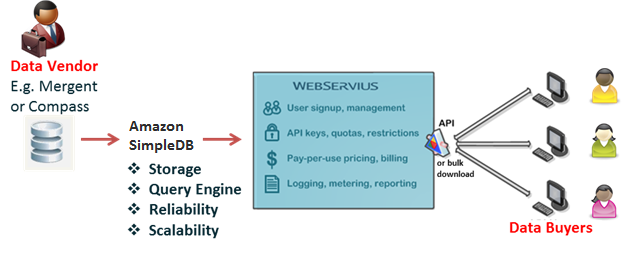
Amazon SDB (Simple DB)
Simple
DB is data storage service to store key-value data types. It features for
storing Key-Value type data with similar way of Cassandra and HBase, faster
query, and no restriction for input data. These characteristics called
Schemeless, and it provides flexibility for non-relational data stores. Geo
Replication is one of the features of the Amazon Simple DB. Geo Replication ensures
the stability for the failure through improving the accessibility of data in
the Simple DB because it is replicated to the data center of Amazon.
Amazon S3 (Simple Storage Service)
If
the SDB is the simplest form of key-value pairs for small size of data, Amazon
S3 is designed for high-capacity storage for the BLOB data such as files,
images, videos, and the other types of large size. It does not limit to the
number and the size of data that can be stored while supports from 1byte up to
5GB per record.
For further information, welcome to visit below.
Tuesday, 9 April 2013
Cloud computing is great but what if.... it rained???
Are there problems with this concept?
Of course there are! If
for some reason your internet goes down, your access to your data also
disappears. There are security concerns with the data and the risk that
companies will use proprietary formats for the files and that require that you
pay for a certain service monthly or you may lose access to your own data
permanently.
So choose wisely when picking a service to use with your
important data and make sure it can be downloaded if needed, but also enjoy the
flexibility those services provide. The wave of the future is in the clouds
Will it change the way we use computers?
The transition from being very ‘personal hardware dependent’ to
a world where resources are shared among the masses is creeping up on us slowly
and unobtrusively. Very many people have already transitioned to using a cloud
environment for most of their time in front of the computer without even
realizing it. Sure, most of us still use some version of Microsoft Office or
Quickbooks that was installed on our computers, but even those kinds of software are now offering an
online version that can be used
instead. The possibility of being able to access your data and software
wherever you need it makes this transition very appealing to most people.
What about you? What cloud services are part of your life?
Thursday, 4 April 2013
Tuesday, 2 April 2013
How the concept works?
Before we dig further into how does cloud computing work, first let’s understand what the term “cloud“ refers to. The concept of the cloud has been around for a long time in many different incarnations in the business world. It mostly means a grid of computers serving as a service-oriented architecture to deliver software and data.
Most websites and server-based applications run on particular computers or servers. What differentiates the cloud from the way those are set up is that the cloud utilizes the resources from the computers as a collective virtual computer, where the applications can run independently from particular computer or server configurations. They are basically floating around in a “cloud of resources”, making the hardware less important to how the applications work.
With broadband internet, the need to have the software run on your computer or on a company’s site is becoming less and less essential. A lot of the software that people use nowadays are completely web-based. The cloud takes advantage of that to bring it to the next level.
For example, if you are hosting your website on a local server or from your PC, you must usually select a particular operating system (Windows/Linux/Mac), to determine what software you can run on that particular server. If your site is being hosted in the cloud, there is no need to do that. You can run Windows and Linux programs side by side.
To understand how does cloud computing work, imagine that the cloud consists of layers — mostly the back-end layers and the front-end or user-end layers. The front-end layers are the ones you see and interact with. When you access your email on Gmail for example, you are using software running on the front-end of a cloud. The same is true when you access your Facebook account. The back-end consists of the hardware and the software architecture that fuels the interface you see on the front end.
Because the computers are set up to work together, the applications can take advantage of all that computing power as if they were running on one particular machine. Cloud computing also allows for a lot of flexibility. Depending on the demand, you can increase how much of the cloud resources you use without the need for assigning specific hardware for the job, or just reduce the amount of resources assigned to you when they are not necessary.
Subscribe to:
Posts (Atom)